Your whole professional practice,
finally in one place.

Manage clients, track billable time, send polished invoices, and close proposals — without juggling five different tools.

Start free 30-day trial Log in

Built for consultants, agencies, and professional service firms.

30-day free trial No credit card required Cancel anytime
Everything a professional service firm needs

From first client contact to final invoice — one platform, no integrations required.

Client Relationship Management

Keep every client in one place with contact details, engagement history, and health indicators that surface which accounts need your attention before they go cold.

Project & Retainer Engagements

Manage time-and-materials projects and recurring retainers under the same roof. Track tasks, set budgets, and see engagement status at a glance — all client-facing work in one view.

Time Tracking Built In

Log billable and non-billable hours directly against engagements without leaving the app. Staff log their own hours; admins see the full picture in the Unbilled Work tracker.

One-Click Invoice Generation

Convert unbilled time entries into a polished, branded invoice in seconds. Send PDF invoices to clients and track payment status — overdue invoices surface automatically in your daily notifications.

Proposal Pipeline

Draft proposals, send them to clients, and track their status from draft to accepted — all in one place. When a proposal is accepted, an engagement is created automatically. No copy-pasting.

AI Assistant

An AI chat built into the platform that logs time, creates tasks, generates invoice drafts, and pulls revenue reports — all from a single typed message. No switching tabs, no manual data entry.

Revenue Reports

See billed revenue over time, break it down by client or engagement, and spot which retainers are up for renewal. Real numbers, not estimates — pulled straight from your invoices.

Proactive Alerts

Daily digest notifications for overdue invoices, proposals going cold, upcoming engagement checkpoints, and retainer renewals — surfaced before they become problems.

Role-Based Access

Admins manage clients, invoices, reports, and billing. Staff log time and manage their own engagements. Each person sees exactly what they need — nothing more.


See FiLoClient in action

Real screens from the product — no mockups.

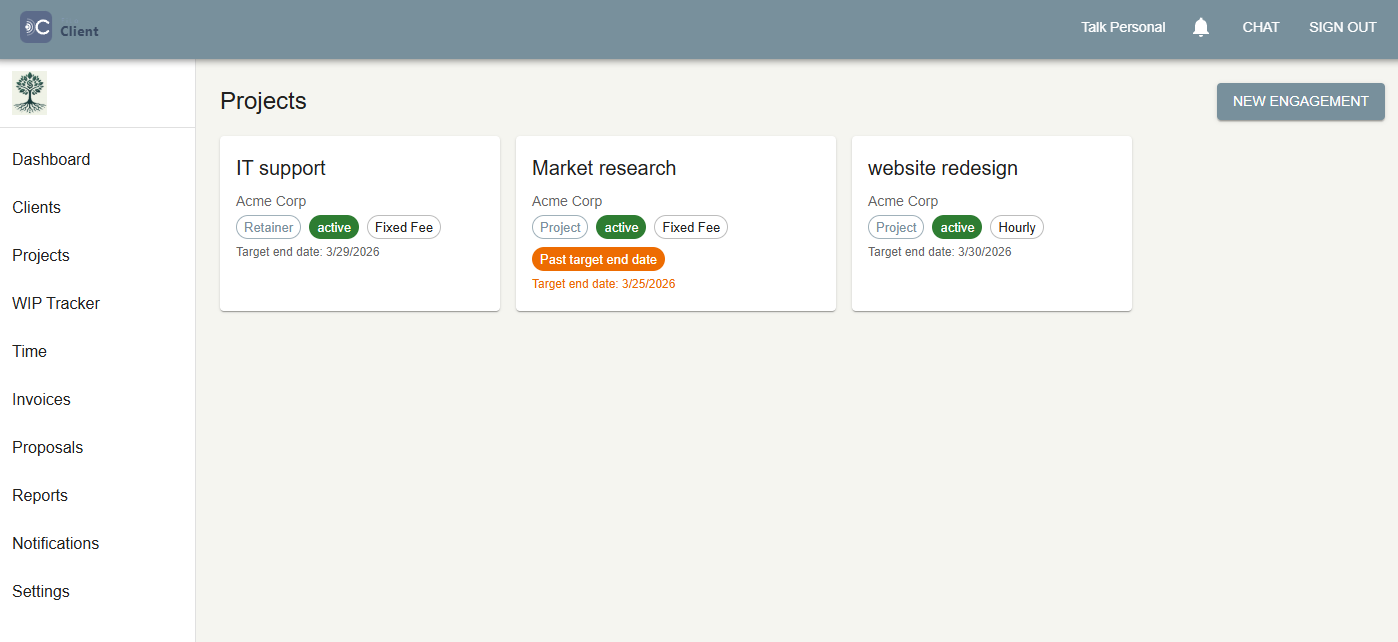
FiLoClient project list
Client engagements

All your projects and retainers, at a glance

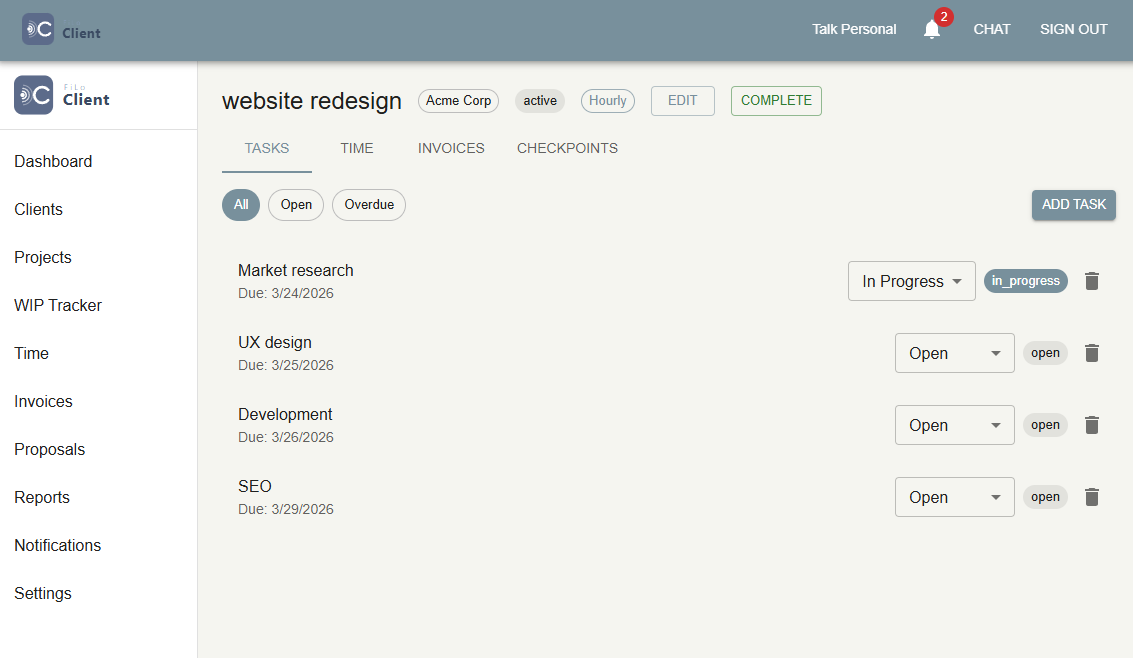
The engagement list shows every active project and retainer with its status, type, and budget. Filter by client, sort by recency, and drill in to see unbilled hours and open tasks. No more digging through spreadsheets to know where things stand.

FiLoClient project details
Engagement detail

Every detail of an engagement in one screen

Time entries, tasks, checkpoints, and status updates all live on a single engagement page. Staff log hours here; admins see total billed vs. budget at a glance. Scheduled checkpoints keep clients informed without a calendar reminder.

FiLoClient time tracking
Time logging

Log billable hours without leaving the engagement

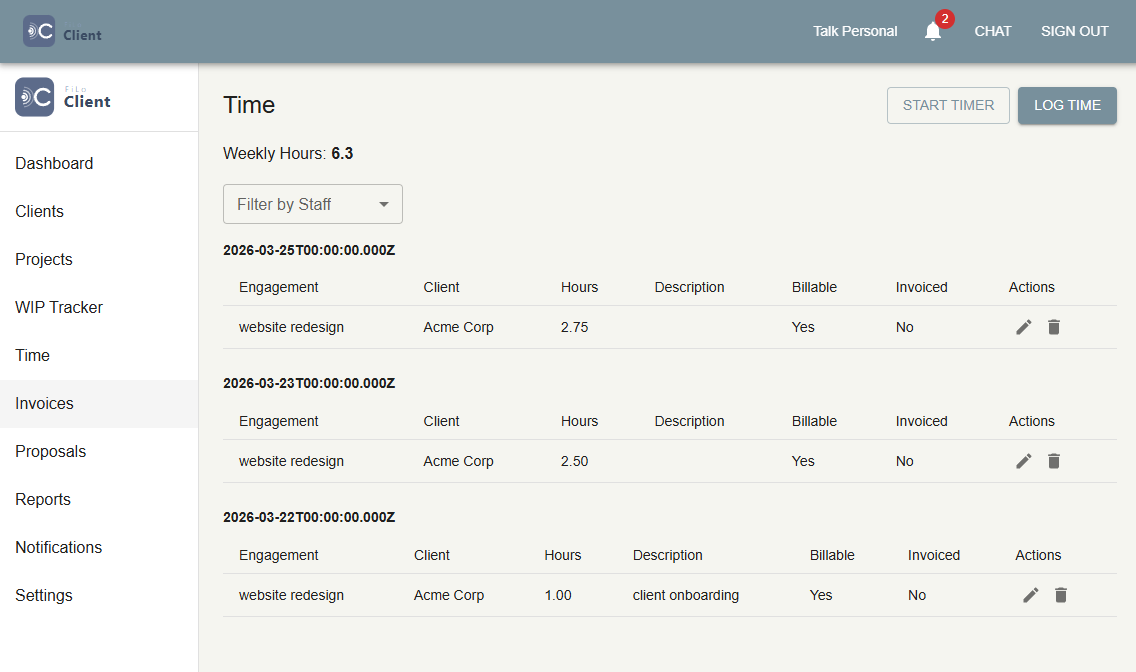
Add a time entry with a description, hours, date, and billing type — in under 10 seconds. Entries appear immediately in the Unbilled Work tracker, ready to be pulled onto an invoice the moment you're ready to bill.

FiLoClient unbilled work tracker
Work in progress

Never lose a billable hour

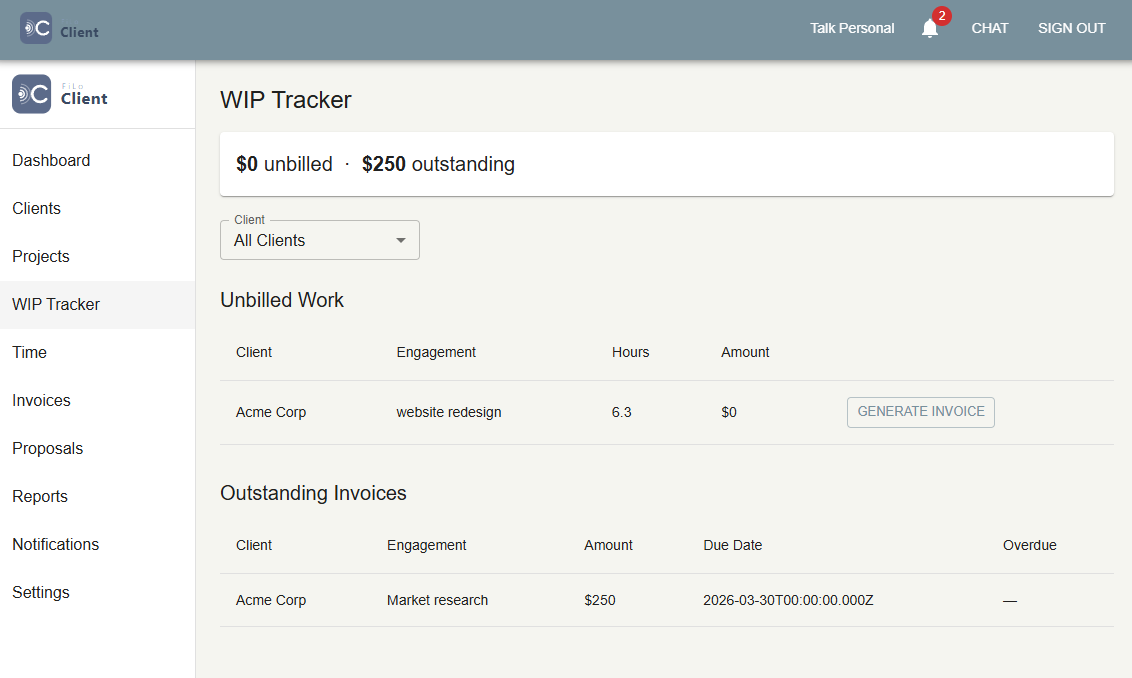
The Unbilled Work page groups every time entry that hasn't been invoiced yet — organized by client and engagement. Select entries, generate an invoice, and the amounts are calculated automatically. Hours that don't get billed are money left on the table.

FiLoClient invoice
Invoicing

Professional invoices in seconds

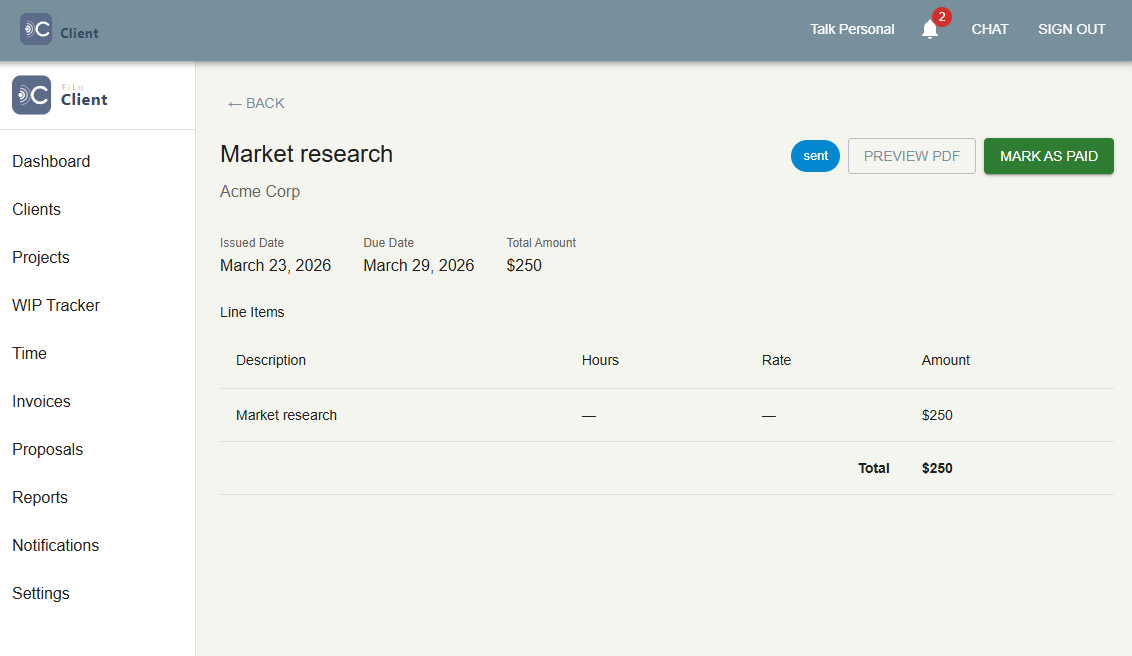
FiLoClient generates clean, branded invoices from your unbilled work. Track payment status — outstanding, overdue, paid — and send PDF copies to clients. Overdue invoices surface automatically so nothing slips through.

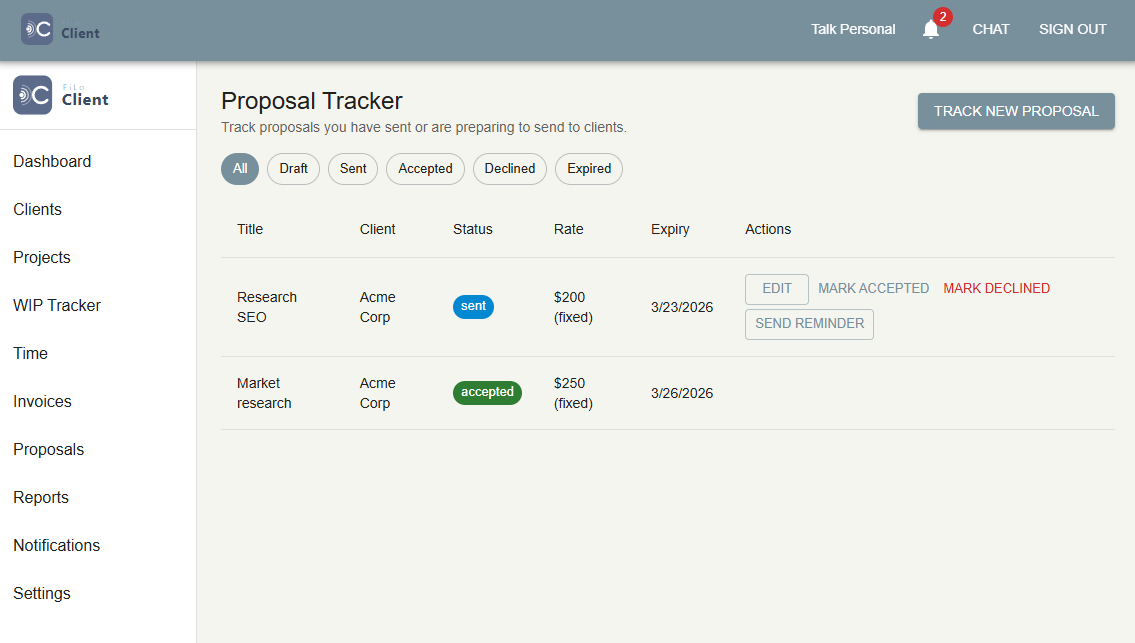
FiLoClient proposal
Proposal pipeline

From proposal to engagement automatically

Draft a proposal with line items and a cover note, send it to the client, and track its status — draft, sent, viewed, accepted, or declined. When the client accepts, a new engagement is created automatically. No copy-pasting from a proposal into a project tracker.

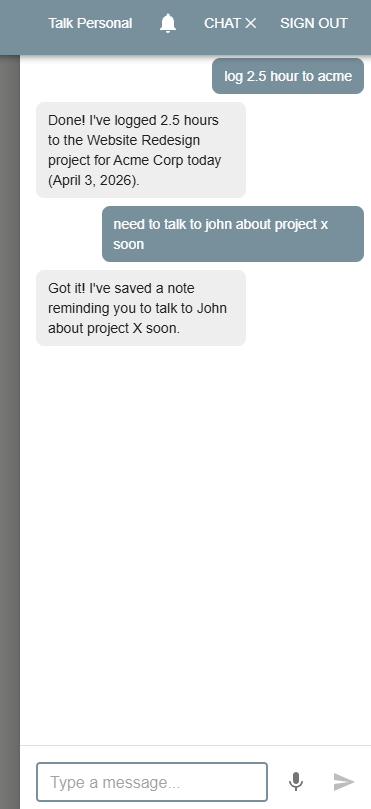
FiLoClient AI assistant
AI assistant

Do the work by typing a message

The built-in AI assistant understands your practice data. Ask "What's on my plate today?", "Log 2 hours on the Acme website project", or "Generate an invoice for all unbilled time on the Henderson account" — and it handles it. Plain language, real results.

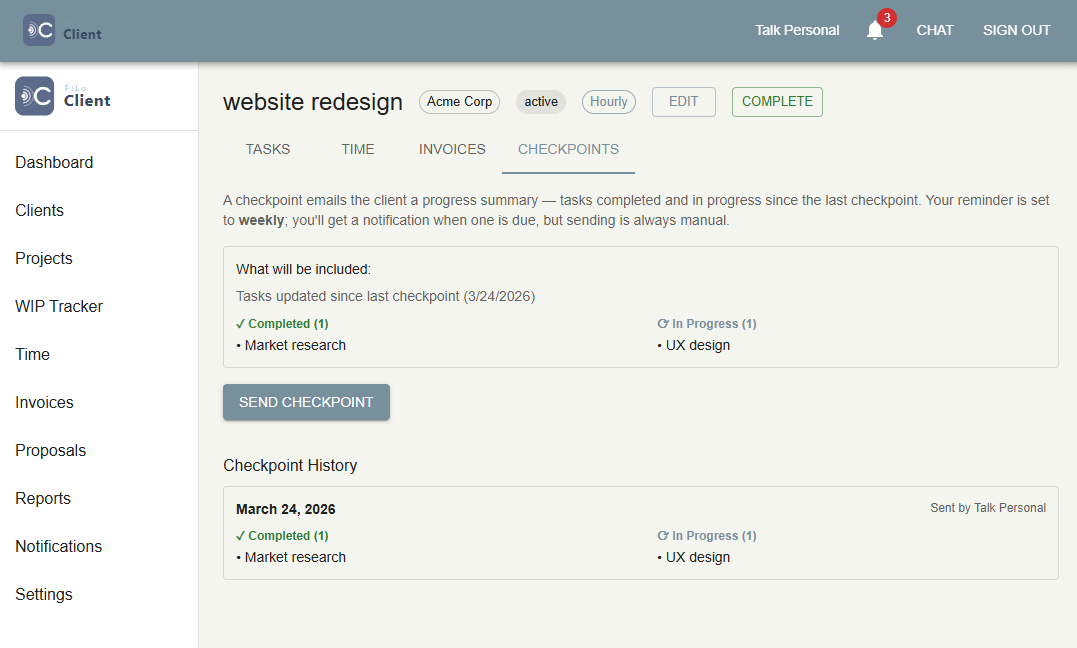
FiLoClient client status update
Client communication

Keep clients in the loop without the chaser email

Scheduled checkpoints automatically prompt you to send a status update to clients at the right moment. No more "just checking in" threads — clients always know where their project stands, and you look proactive without extra effort.


Who uses FiLoClient

Real workflows from solo practitioners to growing studios.

Freelance consultant

Stop losing billable hours to a messy spreadsheet

Maya runs a solo strategy consulting practice. She used to track hours in a spreadsheet and invoice in Word — and regularly forgot to bill for small sessions. With FiLoClient, she logs time on her phone right after a call, and invoicing takes two clicks at the end of the month. Last quarter she billed 14% more hours than the quarter before.

Design agency

Proposals that turn into projects automatically

Bright Studio sends 8–12 proposals a month. Their old process: draft in Google Docs, export PDF, email client, then manually recreate the project in their tracker when it was accepted. Now the proposal lives in FiLoClient, and when the client signs, the engagement is created automatically — saving 30 minutes per deal.

Marketing retainer firm

Never let a retainer slip into scope creep

Harbor Digital manages 18 monthly retainers for SMB clients. They use FiLoClient to log hours against each retainer budget and see which clients are approaching the cap before the month ends. Proactive alerts tell them when a renewal is coming up — no more awkward conversations about overruns after the fact.

IT services firm

One place for every client, project, and invoice

Nexus IT handles 40+ clients across ongoing support contracts and one-off projects. Before FiLoClient they used separate tools for CRM, time tracking, and invoicing that never quite stayed in sync. Now staff log time in the same system that generates invoices — the client view always reflects what was actually worked and billed.

Financial advisor

Structured checkpoints that replace manual follow-up

Anne runs a registered investment advisory. Her compliance workflow requires regular client touchpoints. FiLoClient's scheduled checkpoints automatically surface when it's time for a quarterly review — she fills in the notes and sends the status update without needing a separate reminder system.

Software development studio

AI assistant that logs time and pulls reports instantly

Devstack has five developers who hate manual admin. They use FiLoClient's AI assistant to log time via chat ("log 3h on Acme API sprint, billable"), pull weekly revenue summaries, and create invoice drafts — without anyone opening a separate tool. The AI knows the project data and does the busywork.


Up and running in minutes

No onboarding call required — your 30-day trial starts the moment you verify your email.

1

Create your account

Sign up with your firm name, email, and password. Verify your email address and your 30-day free trial starts immediately — no credit card required.

2

Add your first client

Go to Clients and create a client record. Add contact details and any notes about the relationship. You're ready to start creating engagements.

3

Create an engagement

Start a project or retainer under the client. Set the engagement type, billing rate, and a budget if relevant. Add team members in Settings, then assign them to the engagement.

4

Log time and create tasks

You and your staff can start logging hours against the engagement immediately. Use the AI assistant to log time by chat, or use the time entry form — whichever fits your workflow.

5

Generate your first invoice

Go to Unbilled Work, select the time entries you want to bill, and click Generate Invoice. FiLoClient builds the invoice automatically. Download the PDF and send it to your client.


Straightforward pricing

Pay for the team size you have — no per-seat surprises.

30-day free trial on every plan. Full access, no credit card required until you're ready to subscribe.

Solo

Admin only — no staff seats

$29
/ month
or
$290
/ year
Save $58/yr
  • Unlimited clients & engagements
  • Time tracking, invoices, proposals
  • AI assistant
Start free trial

Studio

11+ staff — unlimited seats

$99
/ month
or
$990
/ year
Save $198/yr
  • Everything in Small
  • Unlimited staff logins
  • Auto-upgrades as your team grows
Start free trial

Plans upgrade automatically as your team grows — no manual plan changes required.

Cancel anytime — no questions asked No cancellation fees No long-term contracts
First Locus