FiLoLoyal gives your customers a simple points or stamp card — no app download required. Set up in minutes, run it from any browser.
Built for small businesses that want repeat customers without the complexity.
Award points based on dollars spent, or count visits like a traditional punch card. Set your mode and reward threshold in Settings after signing up — and switch at any time.
Each customer gets a 4-digit code — on a card, a keychain tag, or saved in their phone. No app to download. Clerks enter the code to look up their balance instantly.
Your clerk enters the customer's code, records a purchase or visit, and the balance updates immediately. Redeeming a reward takes one tap.
See all customers, their current balances, and pending rewards at a glance. Review transaction history filtered by customer. Manage everything from your browser.
Give your staff a shared clerk account to process earn and redeem transactions. Clerks can't access admin pages — customer data stays protected.
Two simple tiers based on customer count — Small (up to 500) or Large (unlimited). No per-transaction fees. Manage invoices and payment details through the self-service billing portal.
Real screens from the product — no mockups.
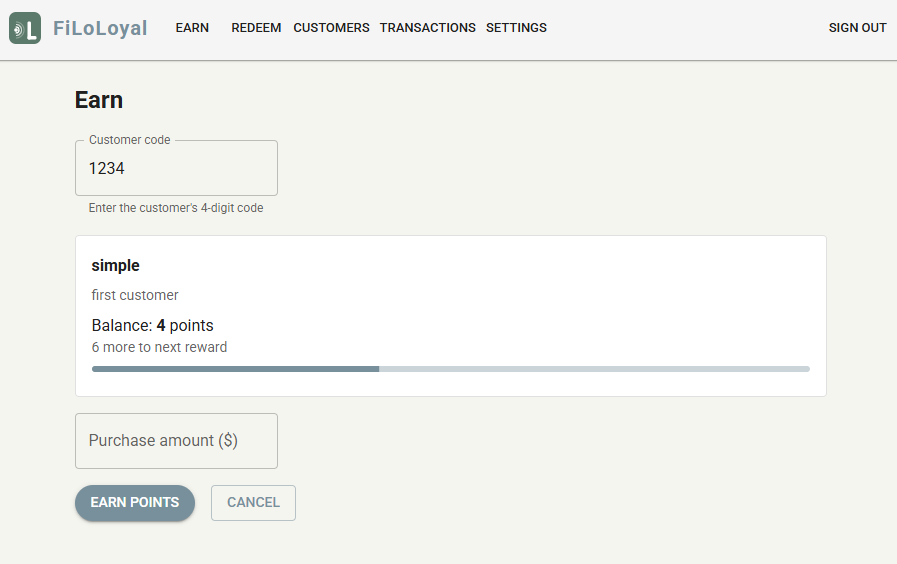
Your clerk enters the customer's 4-digit code and sees their name, balance, and progress toward the next reward instantly. Enter the purchase amount and hit Earn — done. The whole transaction takes under 10 seconds.
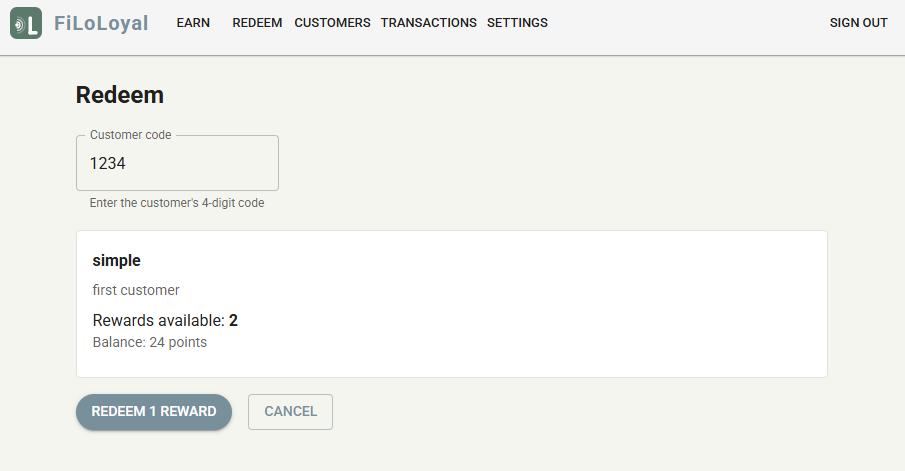
When a customer has rewards ready, the Redeem page shows exactly what's available. One tap records the redemption and the balance resets toward the next one — no confusion, no manual tracking.
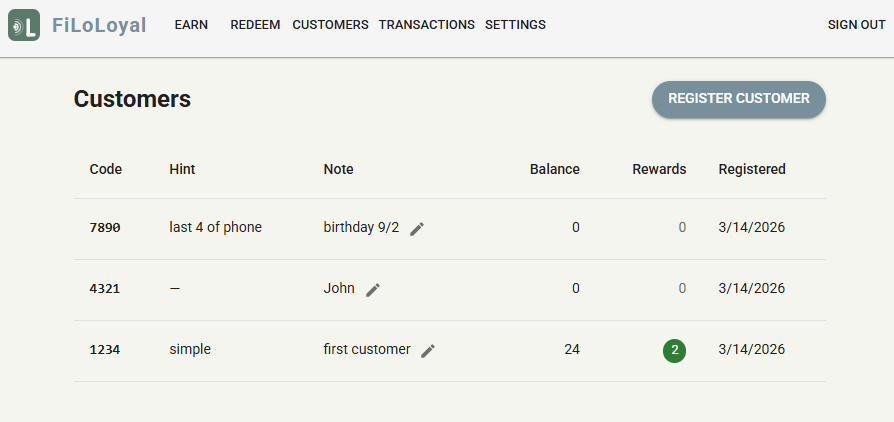
The customers page lists every registered customer with their code, balance, pending rewards, and a personal hint your staff added. Add notes like "birthday 9/2" or "last 4 of phone" to help your team give genuinely personal service.

Real businesses that turned one-time visitors into regulars — without any apps or hardware.
Harbor Brew had a classic "buy 9 get 1 free" stamp card, but customers forgot them, lost them, or just stopped coming after a gap. They switched to FiLoLoyal's visit mode with the same 9-visit threshold. Customers remember their 4-digit code far better than they kept a card — and redemptions are up 40% since the switch.
Luxe Nails used to rely on memory to recognise their loyal regulars. With FiLoLoyal the admin dashboard shows every customer's last transaction and running balance. Staff now greet returning clients by name and can tell them exactly how close they are to their next reward — which clients genuinely love.
Crumb & Co switched from visits to points mode so larger purchases earn faster. Cashiers ask for the customer's 4-digit code, enter the order total, and tap Earn. The whole thing adds under five seconds to checkout. No app to open, no QR code to scan — just the code the customer already knows.
Paws & Co books appointments every 6–8 weeks per dog. Their reward threshold is set to 5 visits — roughly one free groom per year. Customers are noticeably more likely to rebook on the spot when they know they're two visits away from a free session. The owner set the whole thing up in 20 minutes.
Centered Studio runs a visit-based program where every class earns a stamp. At 20 visits, members get a free class or a discount on their next pack. The clerk tablet lives at the front desk — members call out their code as they sign in. The owner tracks which members are close to a reward and mentions it when they walk in.
SparkWash operates three drive-through sites under one FiLoLoyal account. Customers earn visits at any location — their code works everywhere. The admin sees all transactions across all sites in one view. Before FiLoLoyal they had three separate paper stamp systems that couldn't be consolidated; now it's one program, one login.
From sign-up to your first loyalty transaction in under 10 minutes.
Sign up with your company name, email, and a password. Enter your payment details and your account is instantly activated. You'll configure your loyalty mode and reward threshold in Settings.
Go to Settings and click "Create Clerk Account". This generates a shared login for your staff to process transactions at the counter without admin access.
Go to Customers and click "Register Customer". Ask the customer for a 4-digit code — such as the last 4 digits of their phone number — so they can easily remember it. You can optionally add a name hint to help identify them.
Log in as the clerk, go to Earn, and enter the customer's 4-digit code. For points mode, enter the purchase amount. For visits mode, just confirm the visit. The balance updates instantly.
When a customer reaches the threshold, the Redeem button activates on the Redeem page. One tap records the redemption and resets their balance toward the next reward.
Start small, scale as you grow. No per-seat fees.
Start on the Small plan — automatically upgrades when you pass 500 customers.