FiLoTime gives your hourly workers a PIN-based kiosk to clock in and out. Accurate timesheets without the complexity.
See how FiLoTime takes the pain out of time tracking for small businesses with hourly workers.
FiLoTime covers the full clock-in workflow for teams with hourly workers.
Employees clock in and out by entering their 4-digit PIN on any tablet or shared device. No app download required — just open a browser.
Define work locations, each with its own timezone. Punches are stamped with the correct local time no matter where your employees work.
Filter shifts by employee, location, and date range. Export to CSV for payroll. See total hours and shift summaries at a glance.
Add employees, assign PINs, and activate or deactivate them instantly. All changes take effect on the kiosk immediately.
Register kiosk devices using a one-time activation code. Rename or revoke devices at any time from the admin dashboard.
No per-seat surprises. One flat price based on your team size. Manage invoices and payment details through the self-service billing portal.
No mockups — this is what you actually get.
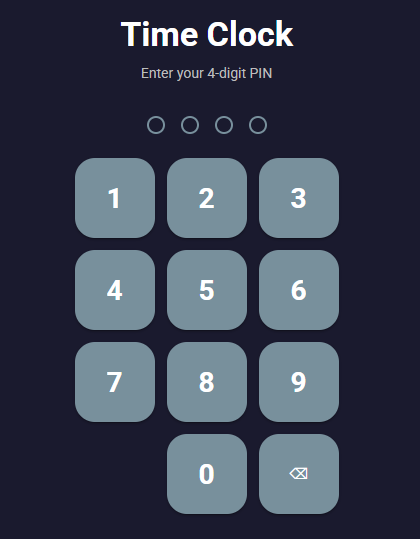
Employees see a clean PIN keypad on any tablet or shared computer. They enter their 4-digit PIN to clock in — and tap it again to clock out. No app, no login, no training needed.
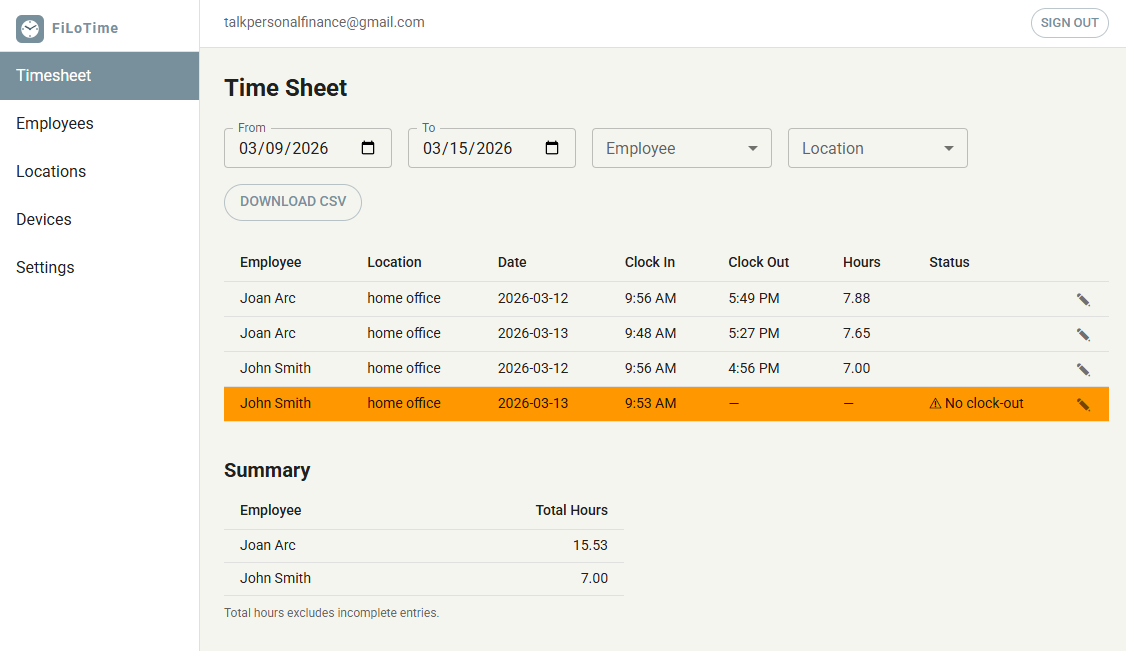
Filter timesheets by employee, location, and date range. Incomplete punches are flagged in orange so nothing slips through. Download a CSV for payroll in one click.
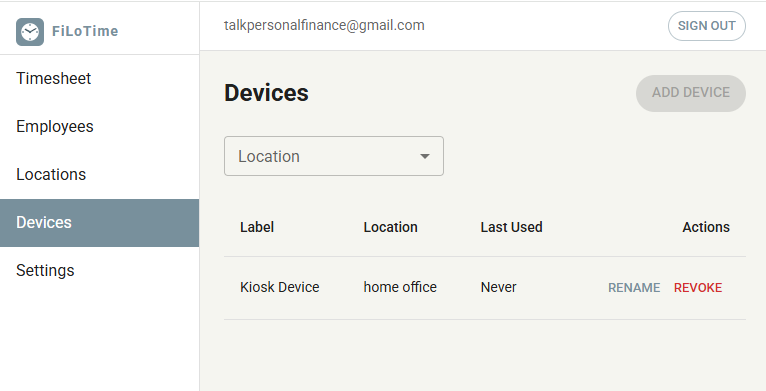
Register kiosk devices using a one-time activation code. Label each device, assign it to a location, and revoke access instantly if a device is lost or retired — all from the admin dashboard.

Real workflows from small business owners who've replaced the paper sign-in sheet for good.
Marco runs a 12-person kitchen and front-of-house team. His paper sign-in sheet was being filled in after the fact — or not at all. He mounted a tablet by the back door, gave everyone their PIN, and within a week had accurate timestamps for every shift. Payroll disputes dropped to zero.
Priya manages four part-time staff at her boutique. She used to text everyone on Sunday asking for their hours. Now the kiosk sits at the register — staff clock in when they arrive and out when they leave. She exports the timesheet on Friday and it goes straight to her bookkeeper.
Clean First runs crews at 6 commercial sites. Each site has its own tablet acting as a kiosk — set to the right timezone. The admin sees all locations in one timesheet view, filterable by site. They caught two chronic late arrivals within the first fortnight that previous paper records had hidden entirely.
Little Steps Centre is required to document staff-to-child ratios. FiLoTime gives the director a timestamped record of when every carer clocked in and out — useful for compliance reporting and eliminating the manual tally they used to do at the end of each week.
Ironside Gym has 10 trainers on casual contracts who work irregular hours. Coordinating timesheets by email was a nightmare. Now trainers clock in before their first session on the front-desk tablet. The owner reviews hours weekly and exports a CSV for the payroll service — the whole process takes five minutes.
After their 20-year-old punch clock gave up, Swift Logistics needed something fast. FiLoTime was running on a spare laptop by the loading dock the same afternoon — no hardware to order, no engineer to call. Staff adapted immediately because entering a 4-digit PIN is no different to what they did before.
Get from sign-up to your first time punch in about 10 minutes.
Sign up with your company name, email, and a password. Enter your payment details and your account is instantly activated.
Go to Locations and create each work site. Set the correct timezone for each one so that shift times are always accurate.
Go to Employees and add each worker with their name. The system assigns them a 4-digit PIN they will use at the kiosk to clock in and out.
Open the Devices page, select a location, and click "Add Device". Enter the activation code on the tablet or computer that will serve as the kiosk. That device is now your time clock.
Point employees to the kiosk URL. They enter their PIN to clock in, and tap it again to clock out. Each punch is recorded with timestamp and location.
Use the Timesheet page to review all shifts. Filter by employee or date range and export a CSV to feed into your payroll process.
Flat rate. No per-seat fees.